Upload your logger's CSV and Fusion times every corner of your lap against your best, shows you on the aerial photo of your track exactly where the time went, and tells you what to change.
No sign-up for the demo$3.99 a month, cancel any timeAiM, MyChron & VBOX CSVs
Biggest loss · T9 +0.264sGriffith Kart ClubLap 26 vs best lap 12+0.464s found corner by corner
The problem
Lap times say how slow. Never where.
Every tenth you're missing gets paid for in tyres, test days and entry fees. A lap timer tells you that you were slow. It can't tell you which corner, or what to change before the next session.
Tyres
Burned finding speed
Sets of rubber spent on laps that teach you nothing you can act on.
Test days
Paid for, then guessed through
Hours of practice where you go home with a time, not an answer.
$1,000+lap timer
"You were slow."
No setup changes. No driving advice. Nothing to do differently next lap.
Too late
Tips after the day
A list of notes downloaded after the session is no use once the session is over.
Fusion is the affordable race team you bring with you on the day.
A real session
Griffith. 26 laps. 0.464s.
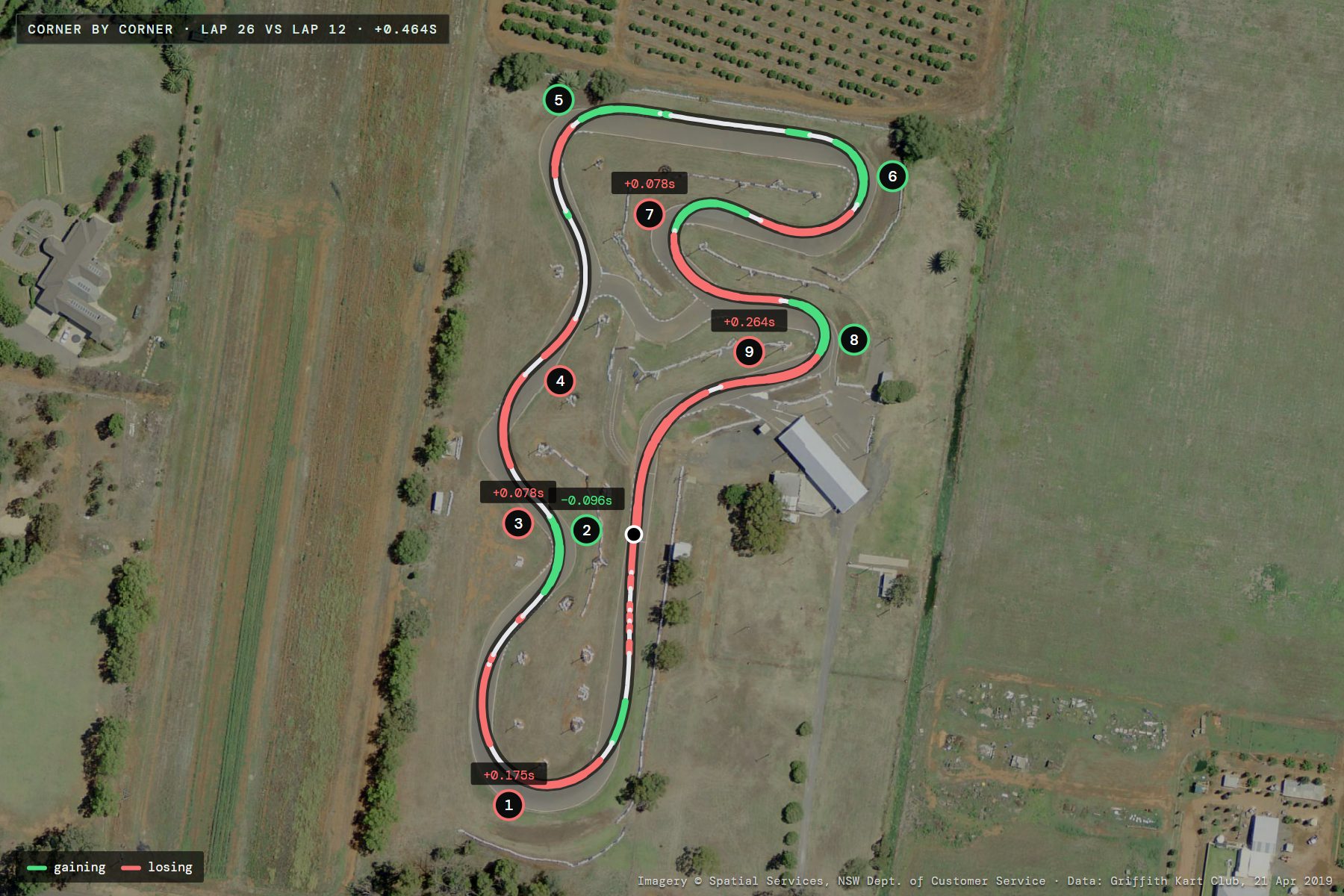
Not a mock-up. This is Tasman's own session at Griffith Kart Club, run through the Fusion app exactly as yours would be, laid over the real aerial photo of the circuit. Lap 26 against his best, lap 12: +0.464s slower, and every corner accounted for.
TrackGriffith Kart Club, NSW
Date21 Apr 2019
Best lap40.416s · L12
Ideal lap39.876s
Top speed100.7 km/h
Laps26 · 20 Hz
Total gap+0.464s
Biggest lossT9 +0.264s
Turn
Gap
Min km/h
What changed
T1 R
+0.175
64 / 65
6 m later braking
T2 L
−0.096
66 / 63
+3 km/h at apex
T3 R
+0.078
70 / 71
No change
T4 L
+0.018
78 / 80
−2 km/h at apex
T5 R
−0.022
61 / 63
−2 km/h at apex
T6 R
−0.005
55 / 52
4 m later braking
T7 L
+0.078
49 / 48
No change
T8 R
−0.026
47 / 44
+3 km/h at apex
T9 L
+0.264
63 / 66
−3 km/h at apex
Lap 26 vs lap 12. Min speed is lap 26 / lap 12. Braking points are where the speed starts falling, from GPS.
Time gap through the lap (s) · above the line = behind lap 12
0 m790 m
Where the kart brakes and drives
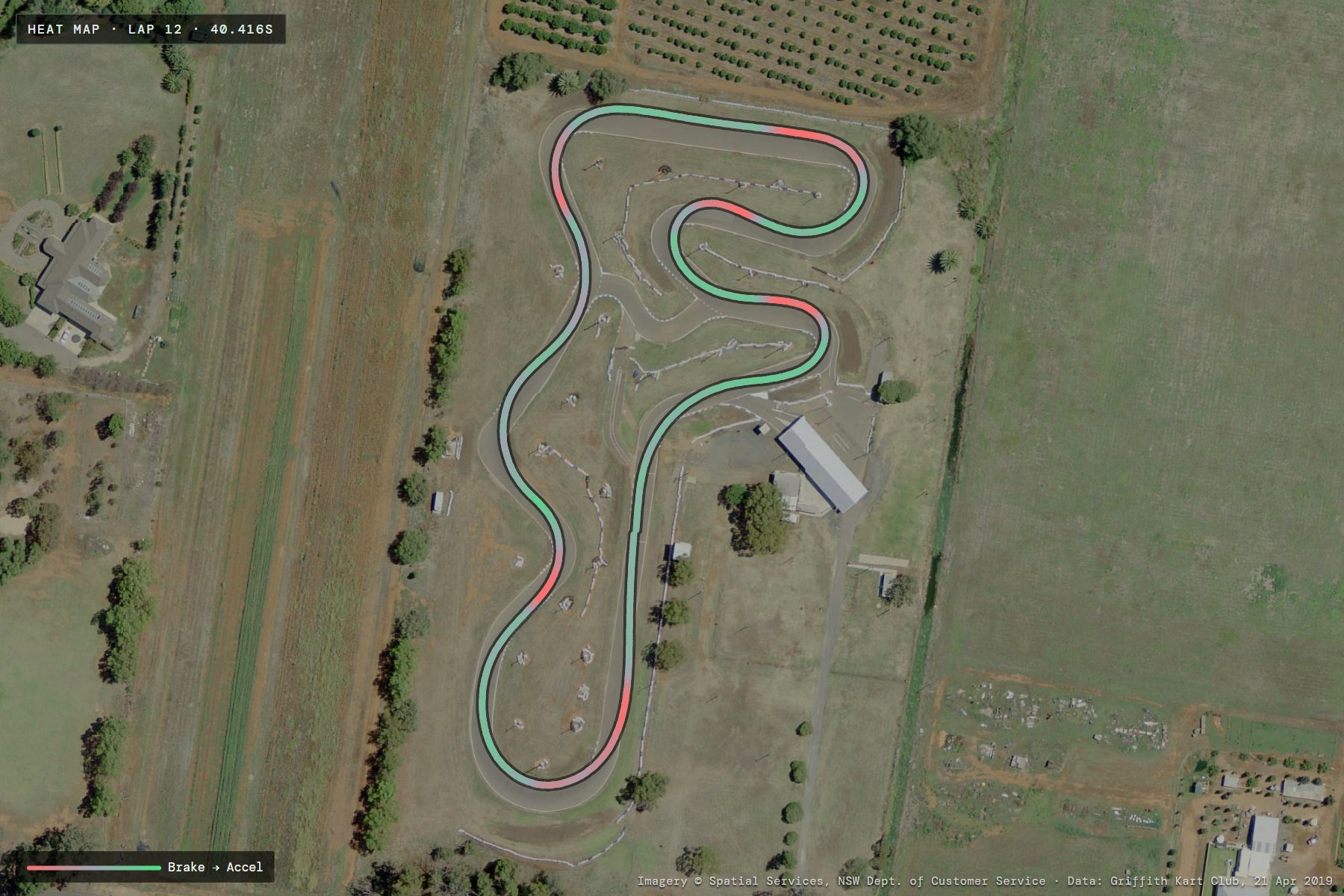
Lap 12, coloured by longitudinal g: red where the kart is slowing, green where it's driving out. Touch any point in the app to read speed and RPM there.
Hardest braking-0.79 g
Peak drive+0.44 g
Peak cornering1.65 g
Low speed44 km/h
Two laps, one photo
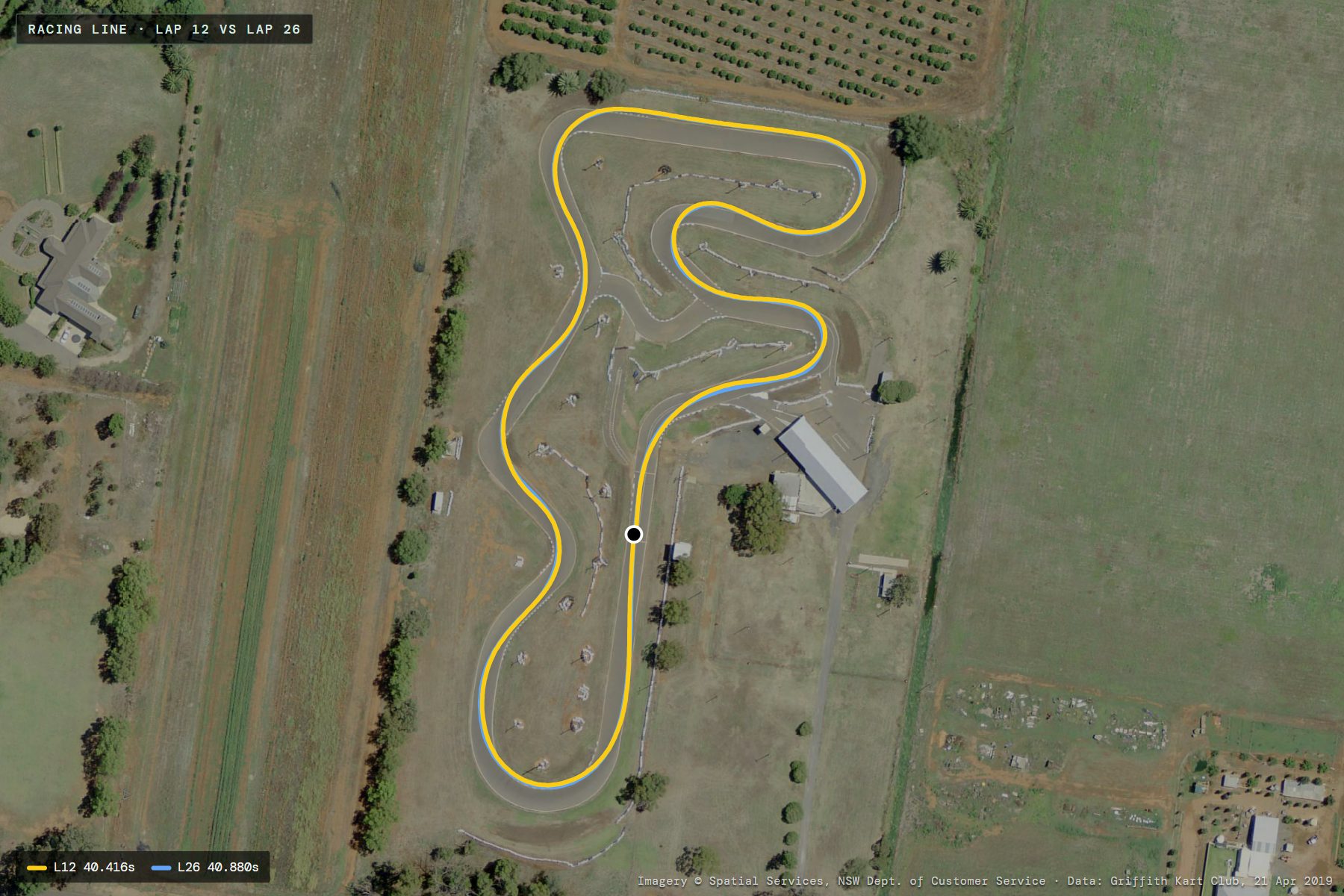
Lap 12 (yellow, 40.416s) against lap 26 (blue, 40.880s), each drawn where the GPS put the kart. Zoom in on any corner in the app to see where the lines split.
Lap 1240.416s
Lap 2640.880s
Speed (km/h) · lap 12 vs lap 26
T1T2T3T4T5T6T7T8T9
40 to 100 km/h790 m
RPM · lap 12
6,995 to 14,789 rpm790 m
L145.800+5.384
L264.173out-lap
L343.450+3.034
L440.731+0.315
L540.527+0.111
L640.655+0.239
L740.874+0.458
L841.187+0.771
L940.938+0.522
L1041.241+0.825
L1140.651+0.235
L1240.416best
L1341.520+1.104
L1440.760+0.344
L1541.185+0.769
L1640.759+0.343
L1740.866+0.450
L1841.670+1.254
L1940.764+0.348
L2040.485+0.069
L2140.439+0.023
L2240.680+0.264
L2340.550+0.134
L2440.781+0.365
L2541.020+0.604
L2640.880+0.464
All 26 laps. Lap 1 is the warm-up; lap 2 was a slow lap the app flags and leaves out of the averages. Best corners from every lap add up to an ideal 39.876s.
Want to click around it yourself? Open this session in the live demo: tap any corner to see the time lost, the speeds and what the coach says. No sign-up.
A lap timer tells you that you were slow. After every session the Fusion app tells you what to do about it: on the driving, on the kart, and against your mates. Everything below is real output from real sessions.
01
Driving advice
Fusion lines every lap up against your own best pass through each corner, finds the habits costing you time, and gives you the three changes worth the most, in plain language, with the numbers behind them.
Braking points, apex speed, turn-in and drive out of every corner
Steering smoothness and corrections from the logger's gyro
Consistency: where your laps vary, and by how much
CoachEastern Creek · 10 timed laps
T11
Carry more speed through T11 ~0.17s
Your best passes were 4.0 km/h faster at the slowest point, so the grip is there. Ease off the brake earlier and let the speed roll in to the apex rather than slowing to a crawl.
Minimum speed 70.8 km/h typically, 74.8 km/h on your best passes.
#2
Get up to speed sooner ~0.26s
Your first two timed laps were 1.30s slower than the rest. Use the out-lap to load the tyres so the first flying lap counts.
First two laps averaged 50.91s vs a typical 49.61s.
T1
Pick a brake marker for T1 ~0.12s
Where you start slowing for T1 moves about ±10 m lap to lap. Choose a fixed reference and hit it every lap before trying to move it later.
Braking point varies ±10.4 m across 10 laps.
02
Setup advice
The logger's motion sensor shows how the chassis is behaving: whether the inside rear is lifting cleanly, whether the front is biting, whether the rear is stepping out. Fusion reads it against your setup sheet and tells you what to change, in millimetres.
This TaG's own notes said “old tyres”. Fusion worked that out from the data alone.
SetupEastern Creek · TaG R
Inside wheel lift OKSteering: Smooth · 25°/s²
Low grip overall: peak cornering 1.49 g against roughly 1.8 g for this class, with smooth steering, so the tyres are probably not working.
Check hot pressures straight after the session: a slick should gain 2 to 3 psi from cold.
Gained under 2 psi: raise the cold pressure 0.5 psi so the carcass works and heats up.
Gained over 3 psi: drop it 0.5 to 1 psi. The tyre is overheating and sliding.
Grip comes from the tyre being in its temperature window. Smooth driving with low cornering load points at the tyres, not the chassis.
03
Lap comparison
Put any lap against any other and see the gap corner by corner: where it was won or lost, the speeds through each one, and whether it was the braking, the apex or the drive out.
The gap through every corner adds up to the lap time
Entry, apex and exit speeds side by side
An ideal lap built from your best corners
Corner by cornerLap 10 vs lap 9 · Eastern Creek
Total gap+0.561s
Biggest lossT11 +0.235s
Turn
Gap
Min km/h
What changed
T1 L
−0.027
61 / 61
24 m earlier braking
T2 R
−0.065
70 / 70
No change
T3 L
+0.148
67 / 73
−6 km/h at apex
T4 R
+0.076
64 / 65
−5 km/h on entry
T7 R
+0.100
69 / 71
−2 km/h at apex
T11 R
+0.235
68 / 75
−7 km/h at apex
Six of 11 corners shown. Min speed is lap 10 / lap 9. Ideal lap from the session's best corners: 48.903s.
Also included
Compare laps with your mates
Session posts and a friends' feed
Theoretical fastest line
Heat map and telemetry traces
Kart garage and setup sheets
Engine hour counters
How it works
Three steps from CSV to answers.
01
Export your session
In AiM Race Studio, open the session from your AiM or MyChron and export it as a CSV. VBOX files and GPS app CSVs work too.
About a minute
02
Upload it to Fusion
Drop the file on the dashboard. Laps are found from your GPS line, at any track, with no beacon or setup.
Seconds
03
Know what to change
See every corner against your best, where you braked and turned in differently, and the coach's fixes ranked by the time they're worth.
Start today with the logger you already own. Upload an AiM, MyChron or VBOX export and everything above is yours on the Fusion dashboard, in the browser on your phone or computer.
Fusion is the affordable race team you bring with you on the day.
Tasman Reedie · Founder & engineer
RacingKart race winner
TradeHeavy vehicle diesel mechanic
DegreeHons. Electrical & Electronics Eng., UOW
BuiltFusion's logger, firmware & app
Tasman in the #7 Arrow.
Tasman Reedie knows what it costs to chase a lap time. He grew up racing karts and became a race winner, but every result came at a price: hours of practice, sets of tyres and money spent on test days that often taught him very little. To keep racing, he left school at 15 and went to work.
He once spent $800 on a lap timer, hoping it would help him find speed. All it told him was that he was slow. It offered no setup changes and no driving advice, so he had no way of knowing what to do differently on the next lap.
That frustration shaped everything that followed. Tasman trained as a heavy vehicle diesel mechanic, rebuilding engines, gearboxes and hybrid systems, and then went back to study. He completed an honours degree in Electrical and Electronics Engineering at the University of Wollongong, and along the way designed embedded firmware, IoT devices and GPS systems. He set out to become the engineer who could build the tool he never had.
Fusion is that tool. Big teams give their drivers a huge head start. Drivers pay thousands of dollars to join them, and on day one they are handed thousands of laps of data showing how to set up the kart for the track and exactly where to brake, turn in and get back on the throttle. Drivers without that support are left guessing, and a list of tips downloaded after the test day is no use when the session is already over.
Tasman designed and coded Fusion himself, pairing an affordable data logger with an app that gives instant feedback. After a single session, drivers get clear insights they can act on straight away, while they're still at the track and it still matters.
Fusion was built to make racing more affordable for drivers on a budget, and that will always be its purpose. In Tasman's words, Fusion is the affordable race team you bring with you on the day.
No logger yet?
The Ghost Logger.
A small logger that rides on the kart and sends every session to Fusion over Bluetooth. Designed for karting: 10 Hz GPS and a motion sensor logging up to 417 times a second, in an aluminium case engraved with your name and race number.
$199.99 first-run price, $249.99 after. 53 being made, and 3 of them are free in the draw.
Yes. The live demo is a real session you can explore without signing up: tap any corner to see the time lost, the speeds through it and what the coach says to change.
What do I need?
A session file from your data logger. Fusion reads CSV exports from AiM loggers (including MyChron), VBOX files and GPS app CSVs. No logger? The Ghost Logger records everything Fusion needs.
How do I get a CSV from my AiM or MyChron?
Open the session in AiM Race Studio, choose Export and save it as a CSV, then upload that file on the Fusion dashboard. Want to see one first? Download a sample session.
What does it cost?
$3.99 a month for everything: corner by corner analysis, the coach, setup advice, lap and friend comparison, and your garage. Cancel any time from your account.
Does it work at my track?
Yes. Laps are found automatically from your GPS line, so it works at any circuit, including ones that aren't in our database, without a beacon or any track setup.
Is my data private?
Yes. Your sessions stay private until you choose to share one with your friends, and you can make it private again at any time.
Is there a phone app?
The Fusion dashboard works in the browser on your phone or computer today. The iPhone and Android apps are in final testing.
Questions about the Ghost Logger?
Price, the draw, engraving and shipping are all on the Ghost Logger page.
FUSION
Get Started
Your fastest lap is in your data.
Fusion is $3.99 a month, cancel any time. Explore the live demo first, or upload your own session today.
Click the link in that email to continue to payment setup. You can open it on this device or your phone. Either way, it takes you straight to the next step.
Not there in a minute? Check your spam or junk folder, orResend email
 Biggest loss · T9 +0.264s